5 Best Habit Tracking Apps to Build Consistency

Setting ambitious goals is an inspiring first step toward self-improvement, but the true challenge lies in following through day after day. Many people discover that while initiating a new routine feels exciting, maintaining positive momentum over months or years presents a continuous hurdle. Without an organized method to monitor daily actions, it becomes remarkably easy to lose focus, forget original intentions, and slip back into familiar, unproductive patterns.
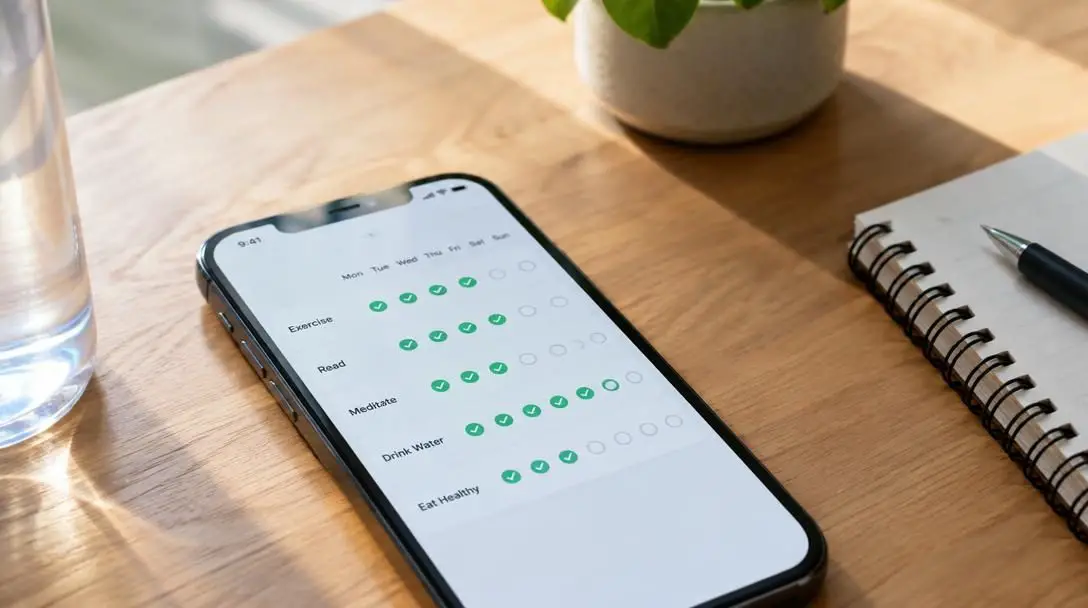
Tracking daily habits provides the structure needed to develop genuine consistency in everyday life. When an action is recorded on a regular basis, it generates an objective record of whether expectations align with reality. Consistency relies heavily on feedback loops: by observing tangible proof of effort each day, individuals can build the steady momentum required to make beneficial behaviors permanent. Digital habit tracking tools provide modern structures to replace reliance on memory or sheer willpower.
Key takeaways
- Tracking daily behaviors creates an objective feedback loop that bridges the gap between ambitious intentions and lasting habits.
- Dedicated mobile applications streamline tracking through scheduled reminders, streak calculations, automated logging, and visual progress charts.
- Different apps cater to distinct motivational styles, ranging from gamified RPG adventures to minimalist checklists and multi-metric project trackers.
- Platform compatibility is a critical consideration, as tools like Streaks and Productive are restricted to iOS devices while others support multiple platforms.
- Sustainable habit building requires starting with a manageable scope, setting realistic notification triggers, and viewing broken streaks as data rather than failure.
The mechanics of digital habit tracking
At its core, a habit tracking app functions by recording specific daily behaviors, visually reinforcing progress, and prompting future actions through timely reminders. While paper trackers or physical checklists have historically served this role, dedicated applications streamline the entire process through automated tracking features, detailed progress tracking, and personalized interfaces. Digital tools make it possible to capture nuanced data without adding administrative friction to daily routines.
Tracking daily habits transforms vague intentions into tangible data, giving you an objective measure of your progress and the momentum needed to make positive routines stick.
Most habit apps rely on a clear, repeatable sequence of actions to sustain engagement:
- Routine definition: A specific routine or task is defined and scheduled within the application interface.
- Timely prompts: The app sends targeted reminders to notify the user precisely when an action is due.
- Status logging: The user marks the habit as completed, or in some cases selects options such as skip to keep an accurate record without distorting long-term data.
- Data visualization: The application logs the entry, calculates active streaks, and generates visual charts or graphs illustrating overall performance over time.
Some applications layer on additional motivational frameworks, such as gamification elements, social connectivity, or customized notes to sustain user engagement. By systematically reinforcing daily behavior, these platforms bridge the gap between initial intentions and lasting daily rituals.
At a glance: comparing the top 5 habit apps
Selecting an application depends heavily on your preferred user experience, analytical needs, and hardware ecosystem. The table below outlines how each leading tool approaches habit formation.
| App | Core approach | Platform support | Key distinguishing feature |
|---|---|---|---|
| Habitica | Gamified RPG | Multiple platforms | Social quests, avatar customization, and XP rewards |
| Streaks | Minimalist constraint | iOS only | 12-task limit to prevent overcommitment |
| Strides | Data and goal metrics | Multiple / iOS | Four tracker types: habit, target, average, project |
| Loop – Habit Tracker | Distraction-free utility | Android / Open | Done or skip marking with detailed charts |
| Productive | Routine-based scheduling | iOS only | Segmented morning, afternoon, and evening routines |
Detailed reviews of the 5 best habit tracking apps
Each habit tracking app utilizes a unique approach to habit management, making it easier for different individuals to find an option that matches their personal preferences, technical requirements, and lifestyle needs. Whether you respond best to gamified challenges, minimalist checklists, or comprehensive data charts, the following five applications represent the most effective options available.
Habitica

- Format: Gamified RPG productivity tracker
- Platform: Multiple platforms supported
- Key mechanism: Experience points, digital rewards, and avatar leveling
Habitica approaches personal productivity through the power of gamification, turning tedious daily tasks into a role-playing game (RPG). In Habitica, completing real-world tasks directly correlates with digital progression: users earn rewards, gain experience points, and level up their in-game characters. The app treats daily obligations, positive habits, and long-term to-do items as quests, imbuing standard administrative chores with an unmistakable sense of adventure.
To personalize the experience, users can customize their avatar to match their aesthetic tastes. Beyond individual gameplay, the app features a social media component that allows users to connect with friends, join forces to complete quests, and offer mutual encouragement. By framing everyday responsibilities as interactive challenges, Habitica offers an entertaining alternative to standard checklist utilities.
- Pros:
- A fun and engaging way to track and complete daily habits through RPG mechanics.
- Built-in social components enable users to partner with friends for joint accountability.
- Broad multi-platform support allows routine management across diverse devices.
- Cons:
- The dense interface and abundance of game mechanics can be overwhelming for first-time users.
- The platform may not appeal to individuals who dislike role-playing games or gaming aesthetics.
Streaks
- Format: Minimalist habit counter
- Platform: iOS only
- Capacity limit: Maximum of 12 tasks simultaneously
Streaks focuses on simplicity, minimalism, and focus. Designed with a clean and visually appealing interface, the app allows users to track up to 12 daily tasks. Rather than encouraging an endless list of unmanageable routines, Streaks emphasizes quality and focus by deliberately restricting the maximum number of habits monitored simultaneously. This structural constraint discourages overcommitment and helps maintain attention on the behaviors that matter most.
The application tracks daily progress and allows users to customize icons to fit their aesthetic preferences. In addition to clean visual indicators, Streaks enables users to set reminders and view their completed streaks over time, providing direct motivation to keep the unbroken chain alive day after day. The minimalist aesthetic ensures that interacting with the tracker never feels like an added chore.
- Pros:
- An intuitive, straightforward interface that avoids visual clutter.
- Personalized habit tracking featuring customized, selectable icons.
- Clear visual displays that make it simple to monitor completed streaks.
- Cons:
- Restricted to iOS only, leaving Android users without access.
- The simplified framework cannot easily accommodate complex or highly detailed habits requiring nuanced data inputs.
Strides

- Format: Multi-metric goal and habit system
- Tracking styles: Target, habit, project, and average
- Templates: Dozens of pre-set goal templates
Strides is designed for individuals seeking a high level of customization and flexibility. The app accommodates multiple approaches to personal measurement by offering four distinct types of trackers: target, habit, project, and average. This versatile architecture makes it suitable not only for basic daily routines, but also for complex goal setting and project milestones where quantitative progress must be measured alongside simple completion checkmarks.
To help users launch their tracking immediately, Strides provides dozens of pre-set templates. The application enables users to track multiple goals simultaneously, set reminders, and make use of automated tracking features for a more efficient routine. Progress is rendered clearly through visual charts that summarize performance over time, offering deep insight into how daily actions feed into overarching personal objectives.
- Pros:
- Four distinct tracker types provide unmatched versatility for varied habit models.
- Automated tracking features create an efficient user experience.
- Visual charts make it easy to view and analyze progress trends over time.
- Enables tracking of multiple complex goals simultaneously.
- Cons:
- The broad range of tracker formats may feel unnecessarily complex for basic checklist users.
- The free version of the application has limited functionality.
Loop – Habit Tracker

- Format: Open, distraction-free utility
- Log options: Mark as done or skip
- Reporting: Detailed visual charts and frequency graphs
Loop – Habit Tracker is a straightforward, functional tool built to help users develop good habits and observe their personal development with ease. The app strips away distractions in favor of straightforward habit entry and clear data visualization. It avoids intrusive notifications, clutter, or complex configurations, offering a direct path to documenting daily consistency without commercial interference.
When managing a routine, users can set reminders and conveniently mark habits as done or skip, ensuring an accurate log without disrupting the integrity of their historical records. As tasks are completed, Loop automatically charts user progress using clear graphs and charts. It tracks streaks while still offering an impressive range of customization options, allowing users to tailor schedules, frequencies, and display settings to maximize utility.
- Pros:
- A simple, user-friendly interface that prioritizes straightforward operation.
- An impressive range of customization options for schedules and display preferences.
- Effective data representation through automatically generated charts and graphs.
- Includes a skip function to maintain streak accuracy without corrupting data.
- Cons:
- The application can be slow to load on certain mobile devices.
- The minimalist design and basic functionality may feel too plain for users wanting social or gamified features.
Productive

- Format: Structured daily routine organizer
- Platform: iOS only
- Structure: Segmented morning, afternoon, and evening routines
Productive provides a structured environment designed to help individuals establish balanced daily rhythms and maintain steady consistency. Featuring a clean design and user-friendly interface, the application enables users to set goals, track ongoing progress, and receive scheduled reminders to stay on track throughout the day. It organizes daily habits into intuitive timeframes, such as morning, afternoon, or evening routines, helping users segment their days logically.
To keep motivation levels high, Productive incorporates encouraging notifications alongside a detailed progress tracking feature that allows users to review their performance over time. Additionally, users can record personal notes within the app, providing space to log thoughts, context, or observations regarding their routines. This reflective element gives context to why certain days felt easy while others posed a challenge.

- Pros:
- Clean, modern interface designed around intuitive daily time blocks.
- Scheduled reminders and encouraging notifications maintain steady momentum.
- Integrated notes feature allows users to document context and daily reflections.
- Cons:
- The free tier permits only a limited number of daily tasks.
- The application is an iOS-only tool, excluding other mobile platforms.
Practical steps to build consistency
Selecting an application is only the first part of establishing a lasting daily routine. Applying deliberate strategies ensures that digital tools translate into genuine behavioral change. Without a grounded strategy, even the best software can be abandoned within a few weeks. The following process helps translate app downloads into sustainable personal habits.
- Start with a manageable scope: Avoid the temptation to log dozens of routines immediately. Focus first on one or two essential tasks so that completing and recording them does not feel like an overwhelming chore.
- Utilize reminders intentionally: Configure notifications inside the app to appear at times when taking action is actually possible. Reminders that pop up during busy commutes or work meetings are often dismissed and quickly forgotten.
- Establish a daily check-in routine: Choose a specific moment each day—such as early morning or right before going to bed—to open the application, review completed streaks, and mark off items.
- Take advantage of app-specific features: If using Habitica, engage with avatar rewards and quests with friends; if using Strides, select the tracker type (target, habit, project, or average) that properly aligns with your objective; if using Productive, utilize the notes feature to log daily reflections.
- Monitor visual progress regularly: Review the charts, graphs, or completed streaks provided by the app. Observing visual proof of consistent effort reinforces self-discipline and encourages continued momentum.
Common habit-tracking mistakes to avoid
When working to establish new habits using digital trackers, users frequently stumble into predictable pitfalls that derail their progress. Being mindful of these common traps can substantially improve long-term success.
- Overloading the tracker: Adding too many complex habits simultaneously often leads to cognitive fatigue and eventual burnout. Limiting the active list makes it far easier to achieve steady momentum.
- Focusing on the tool rather than the action: Spending excessive time tweaking settings, icons, or avatars instead of actually completing real-world habits reduces the effectiveness of tracking.
- Ignoring historical data: Apps like Loop, Strides, and Productive provide detailed performance charts. Failing to review these records means missing out on insights about when and why routines fall apart.
- Viewing broken streaks as absolute failure: Missing a single day happens to everyone. Abandoning the app entirely after breaking a streak eliminates the cumulative benefit of previous consistent days. Utilizing apps that allow users to skip tasks can help maintain accurate records without total demoralization.
What to consider before choosing an app
Before committing to a specific habit tracking application, take time to evaluate your unique circumstances, hardware preferences, and psychological triggers.
First, verify platform compatibility. Both Streaks and Productive are iOS-only applications, which makes them unsuitable for Android users. In contrast, applications that support multiple platforms ensure you can maintain your logs regardless of which devices you use daily.
Next, consider your personal motivation style. If you thrive on competition, role-playing games, and community engagement, Habitica's RPG structure and social quests provide an ideal environment. If you prefer quiet data visualization and minimal screens, Loop or Streaks will offer a more focused experience.
Finally, evaluate the level of complexity you require. If your goals involve multi-step projects, targets, or numerical averages, a robust tool like Strides offers the necessary tracking flexibility. If your primary goal is to check off simple daily routines with encouraging reminders, apps with clean interfaces and note-taking features like Productive will fulfill your needs effectively.
Frequently asked questions
Why should I use an app instead of a paper habit tracker?
While paper trackers are useful, digital applications provide automated tracking features, detailed progress analytics, and timely notifications that alert you when an action is due. Apps also calculate continuous streaks automatically and generate visual charts without requiring manual graphing.
Which habit tracker is best for people who love video games?
Habitica is specifically designed around gamification. It turns your real-world tasks into an RPG adventure where you can level up an avatar, earn in-game rewards, and join forces with friends to complete collective quests.
Are Streaks and Productive available on Android devices?
No. Both Streaks and Productive are iOS-only applications. Android users seeking habit trackers should consider multi-platform or Android-compatible options such as Habitica or Loop – Habit Tracker.
How many habits should I track at the same time?
It is best to start small with just one or two essential tasks to avoid overloading your routine. Notably, the app Streaks enforces a maximum limit of 12 simultaneous tasks specifically to prevent overcommitment and keep users focused on their most important habits.
What should I do if I break an active habit streak?
Do not view a broken streak as a complete failure or abandon your app. Missing an occasional day is normal; focus instead on long-term data and momentum. Apps like Loop – Habit Tracker offer a skip option that allows you to mark a day without resetting your overall tracking record.
The bottom line
Digital habit tracking bridges the divide between aspirational goal setting and daily execution. Whether you prefer the gamified quest lines of Habitica, the focused 12-task limit of Streaks, the multi-format goal metrics of Strides, the minimal clarity of Loop, or the routine-based scheduling of Productive, the right app will support your momentum without adding administrative stress. By aligning software features with your personal habits and starting with a manageable scope, you can turn fleeting intentions into permanent daily routines.