10 Must-Have Mods That Every Rimworld Player Should Have

RimWorld is widely celebrated as an expansive colony management simulation set on a hostile, distant frontier planet. In the base game, players navigate precarious survival scenarios, unpredictable environmental disasters, and volatile social relationships as they establish shelters, cultivate agriculture, fend off raids, and manage the fragile psychological health of their colonists. While this vanilla framework provides tremendous depth and hundreds of hours of organic storytelling, the game's active player community has expanded its boundaries through thousands of user-created modifications.
Modding allows players to customize nearly every layer of the simulation to match their preferred playstyle. Whether eliminating tedious interface friction, introducing strict survival mechanics, or opening new avenues for narrative roleplay, community creations can turn a standard playthrough into a tailored survival saga. The following ten essential modifications stand out for their reliability, polish, and transformative impact on day-to-day colony management.
Key takeaways
- Interface modifications like RimHUD, Medical Tab, and Animal Tab expose vital colonist statistics without cluttering the screen or requiring repetitive sub-menu navigation.
- Logistical additions like Allow Tool and RimFridge save colonist travel time and optimize base layouts through smart hauling and localized food preservation.
- Overhauls such as Combat Extended and Psychology enrich core systems by replacing abstract dice rolls with modeled ballistics and layered emotional profiles.
- Installing mods requires careful load ordering and version verification to prevent game-breaking script errors and save file corruption.
Essential RimWorld mods at a glance
To help plan your next colony loadout, the table below compares each must-have modification by its primary function, core operational benefit, and system impact.
| Mod Name | Primary Category | Core Feature | Gameplay Impact |
|---|---|---|---|
| Prepare Carefully | Colony Setup | Point-buy character and supply customizer | Replaces random starting pawn generation with intentional scenarios |
| Hospitality | Social & Diplomacy | Guest rooms, visitor hospitality, and recruitment | Turns passive wandering visitors into paying guests and recruits |
| Psychology | Colonist Simulation | Dynamic personality models and mental breaks | Deepens personal interactions, political views, and emotional crises |
| Allow Tool | Logistics & Orders | Urgent hauling and global map selection tools | Eliminates tedious manual prioritization of loose map items |
| RimHUD | User Interface | Integrated real-time colonist dashboard | Displays health, needs, and mood directly on the primary display |
| RimFridge | Base Architecture | Compact, powered refrigeration units | Removes the requirement for central walk-in freezers in every room |
| Medical Tab | Colony Health | Consolidated healthcare administration screen | Simplifies scheduling surgeries, treatments, and infection checks |
| Combat Extended | Combat Simulation | Ballistic trajectories, ammunition, and armor penetration | Transforms erratic gunfights into lethal, tactical engagements |
| Animal Tab | Fauna Management | Detailed livestock and pet dashboard | Streamlines animal breeding, slaughtering, and training routines |
| Vegetable Garden | Farming & Cooking | Expanded crop varieties, fermentation, and drying | Diversifies colony diets, agricultural economy, and trade goods |
The ten foundational modifications for every colony
The community has engineered modifications addressing nearly every design facet of RimWorld. However, these ten selections consistently provide the greatest functional returns, addressing interface bottlenecks, tactical depth, and agricultural variety.
Prepare Carefully

- Category: Game Setup & Scenario Customization
- Key Advantage: Complete control over initial roster and gear
- Target Player: Roleplayers and scenario designers
In standard gameplay, starting survivors are generated with entirely randomized backgrounds, character traits, health ailments, and passions. Players seeking a specific narrative or balanced team must often click the randomize button for dozens of minutes in search of viable combinations. Prepare Carefully replaces this unpredictable rolling system with a comprehensive configuration interface before landing. Players can tailor individual skill points, personality traits, physical handicaps, familial links, and personal clothing, as well as exact quantities of food, medicine, and building resources. This gives you the freedom to craft precise roleplay scenarios, whether landing an elite engineering corps, a stranded family, or poorly equipped castaways.
Hospitality

- Category: Social Management & Diplomacy
- Key Advantage: Monetize and recruit passing travelers
- Target Player: Base builders and diplomatic settlements
In unmodded RimWorld, visitors from friendly and neutral factions wander onto your territory, mill aimlessly around your outdoor courtyards for a few hours, and leave without meaningful interaction. Hospitality transforms these passing encounters into a full-fledged economic and diplomatic enterprise by allowing your settlement to operate as a functional inn. Settlements can designate dedicated guest quarters, furnish luxury guest beds, and define entertainment zones. Colonists assigned to hospitality duties serve, entertain, and socialize with patrons. Well-treated guests pay silver, improve their faction's goodwill, and leave behind valuable supplies; furthermore, visitors who form exceptionally strong bonds with your colonists can be formally invited to join the settlement.
Psychology

- Category: Colonist Simulation & Narrative
- Key Advantage: Multi-layered personality and mental break systems
- Target Player: Storytellers seeking complex human drama
While RimWorld is recognized for quirky character interactions, baseline social systems lean on relatively simple mood bars and direct opinion metrics. Psychology deepens the internal lives of pawns by calculating multifaceted psychological profiles that influence social values, political viewpoints, and romantic attraction. Characters form opinions based on shared personal ethics rather than arbitrary dice checks. Furthermore, the mod reworks how mental breakdowns manifest, introducing a wider variety of realistic reactions when pawns reach their emotional breaking points. Instead of repeatedly spiraling into standard bouts of wanderlust or food binging, colonists experience more believable, context-sensitive responses to chronic stress and trauma.

Allow Tool

- Category: Interface & Logistics Management
- Key Advantage: Rapid mass-forbid and urgent transport toggles
- Target Player: Efficiency-focused colony planners
Managing dropped items across massive map tiles frequently creates logistical bottlenecks. Items scattered after a raid or resources dropped from drop pods can sit uncollected in deteriorating weather conditions because generic hauling priorities assign colonists elsewhere. Allow Tool remedies this by introducing targeted context commands, most notably the Haul Urgently action. This priority assignment instructs any available hauler to collect designated goods immediately, bypassing standard work queues. The mod also introduces global selection brushes, enabling players to permit, forbid, or deconstruct items across the entire visible map with a single action.
RimHUD

- Category: User Interface Modernization
- Key Advantage: Consolidated status panel on colonist selection
- Target Player: Players tired of digging through multiple sub-menus
The default graphical interface requires players to cycle through distinct tabs for character backgrounds, health diagnostics, gear inventories, and psychological needs just to assess an individual's condition. RimHUD overhauls this flow by embedding a fully customizable visual display directly into the bottom-left selection window. Highlighting any pawn immediately exposes their immediate physical damage, mental threshold status, rest and nutrition bars, social standings, and active work assignments. Having critical survival indicators visible at a glance cuts down on repetitive clicking and lets players monitor emergencies in real time.
RimFridge
- Category: Logistics & Base Design
- Key Advantage: Modular powered cooling units for food and medicine
- Target Player: Designers wanting compact, efficient layouts
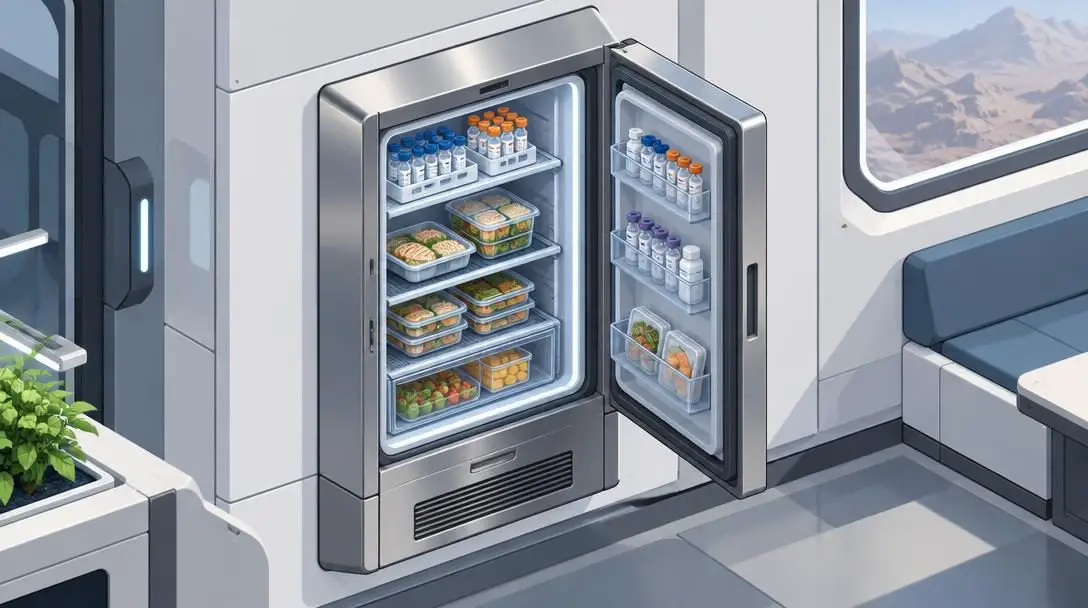
Vanilla food preservation forces colonies to build massive, dedicated freezer chambers powered by power-hungry industrial air conditioners. This architecture forces colonists to walk considerable distances between bedrooms, the dining hall, production rooms, and the freezer just to eat a meal or retrieve medicine. RimFridge adds compact refrigeration furniture, ranging from single-tile containers to multi-tile wall units that fit flush within room dividers. These appliances preserve cooked meals directly in dining halls, store fresh herbal medicine in hospitals, and house butchered meat next to cooking stoves, significantly cutting down pawn travel time.
Medical Tab

- Category: Colony Health Administration
- Key Advantage: Centralized surgical and treatment schedule
- Target Player: Caretakers handling large colonies and disease outbreaks
Tracking the physical health of dozens of colonists, prisoners, and trained animals becomes chaotic following a grueling siege or an epidemic of sleeping sickness. Medical Tab consolidates all health-related tracking into a single, comprehensive dashboard. The screen lists all pawns alongside their current injuries, blood loss rates, active infection progressions, chronic illnesses, and assigned medical care tiers. From this single interface, players can queue surgical amputations, schedule prosthetic installations, or adjust medicine quality settings without hunting down and selecting individual hospital beds across the compound.
Combat Extended
- Category: Combat Mechanics Overhaul
- Key Advantage: Modeled ballistics, ammunition tracking, and suppression
- Target Player: Players demanding lethal, realistic tactical combat
The standard combat framework uses an abstract, probability-driven roll system where point-blank rifle shots can repeatedly miss targets standing in open fields. Combat Extended discards this framework, replacing it with simulated ballistics, physical projectile paths, and rigorous armor penetration calculations. Gunfights become dangerous, fast, and decisive. Pawns under heavy fire experience tactical suppression, forcing them to crouch and lose accuracy unless properly supported. Colonists must also manage physical magazines, carry matching ammunition calibers, and switch between hollow-point rounds for unarmored raiders and armor-piercing cartridges to defeat heavy mechanoid armor.
Combat Extended trades abstract dice rolls for modeled trajectories, turning wild shootouts into lethal, calculated skirmishes where cover and caliber dictate survival.
Animal Tab
- Category: Livestock & Domestic Management
- Key Advantage: Unified breeding, slaughter, and training controls
- Target Player: Ranchers maintaining extensive herds and attack packs
Livestock breeding and pack management are cornerstones of sustainable survival, yet keeping tabs on shifting animal numbers in vanilla RimWorld can be tedious. Animal Tab provides an organized control center dedicated exclusively to domesticated animals. The dashboard details gender ratios, reproductive cycles, training retention, and overall health status. Crucially, it allows players to assign batch commands for animal slaughter and medical operations, making it easy to cull aging males, designate attack animals for field training, or prevent livestock overpopulation from depleting the settlement's hay reserves.

Vegetable Garden
- Category: Agriculture & Resource Processing
- Key Advantage: Expansive crop varieties and food preservation recipes
- Target Player: Agrarian, farming, and trade-focused settlements
Standard agriculture centers on a small group of dependable staples, such as rice, corn, potatoes, and healroot. Vegetable Garden revitalizes the farming system by introducing dozens of new crops, including seasonal vegetables, fruit-bearing trees, and specialized textile plants. Beyond field variety, the mod incorporates historical preservation techniques, allowing colonists to dry fruits, ferment goods, and bake complex meal types. This variety provides new avenues for cooking, expands settlement export possibilities, and turns agriculture into a multifaceted engine for economic growth.
How these modifications alter core survival systems
Combining these community modifications changes the baseline game by removing user interface clutter while deepening the underlying tactical simulation. In unmodded RimWorld, players regularly wrestle with limited interface visibility and high-frequency micromanagement. By installing these curated additions, the colony experience evolves across several critical dimensions:
- Quality-of-life efficiency: Tools like RimHUD, Medical Tab, Animal Tab, and Allow Tool leave basic survival mechanics untouched while exposing crucial information. Players spend less time digging through nested sub-windows and more time making strategic decisions.
- Narrative and emotional depth: Psychology and Hospitality replace flat character encounters with dynamic personalities and commercial hospitality, encouraging players to construct functional social hubs and follow nuanced character relationships.
- Base logistics and layout: Incorporating RimFridge and Vegetable Garden liberates base design from repetitive walk-in freezer structures and opens diverse cooking workflows, encouraging efficient floor plans.
- Tactical danger and setup agency: Prepare Carefully removes arbitrary starting rolls, while Combat Extended raises the combat stakes, demanding strict logistical planning, ammunition crafting, and tactical positioning during raids.
Step-by-step installation and load order best practices
Modding a sophisticated simulation engine requires a careful setup process. Conflicts in script execution or poorly ordered assets can introduce subtle errors or corrupt save files. Follow these steps to ensure a stable setup:
- Verify game version parity: Before downloading any file, check that the mod matches the exact active patch version of your RimWorld installation to avoid missing code references.
- Download via verified channels: Obtain your files through the digital storefront workshop or extract downloaded archives directly into the designated "Mods" folder in the game directory.
- Organize a logical load order: Place core libraries and foundational frameworks at the top of the list, followed by user interface tools (RimHUD, Medical Tab), game mechanic additions (Hospitality, Vegetable Garden), and complete tactical overhauls (Combat Extended) near the end.
- Conduct a staging test: Activate your selections in small groups rather than all at once. Generate a temporary test colony to confirm that crafting tables populate correctly, interface panels display, and the developer console remains free of critical red errors.
Critical modding pitfalls to avoid
Even seasoned players run into trouble when combining disparate additions. Keep these common mistakes in mind when configuring your setup:
- Ignoring overhaul incompatibilities: Complex modifications like Combat Extended alter foundational systems and require explicit patches to function alongside mods that introduce custom weapons, armors, or creatures.
- Introducing heavy mechanics to ongoing campaigns: While lightweight interface tweaks such as RimHUD can safely be introduced mid-game, systemic overhauls and mods adding new crops or buildings should be introduced in a fresh save.
- Dismissing red console errors on startup: Yellow text indicates benign warnings, but red developer logs point to broken code dependencies. Ignoring these warnings can lead to broken colonist pathfinding or damaged save files.
- Removing asset-heavy mods mid-playthrough: Deleting mods that introduce physical items (like RimFridge or Vegetable Garden) leaves missing data entries in existing saves, which can permanently break pawn routines.
Frequently asked questions
Can I safely install these mods on an existing save game?
Lightweight user interface mods like RimHUD, Medical Tab, Animal Tab, and Allow Tool can usually be enabled mid-game without issue. However, complex mechanic overhauls such as Combat Extended, Psychology, and Vegetable Garden should be reserved for a brand-new campaign to prevent data corruption and broken map references.
Why does Combat Extended cause compatibility issues with other mods?
Combat Extended completely replaces the vanilla probability-based hit system with custom ballistic physics, trajectory tracking, and specific ammunition calibers. Because it changes how damage is calculated, any third-party mod adding new firearms, armor types, or alien species needs a compatibility patch to provide appropriate ballistic values.
How does RimFridge improve colony efficiency over regular freezers?
In the vanilla game, all perishable items require large walk-in freezer rooms, forcing colonists to make long trips across the base. RimFridge adds small, powered refrigerated storage units that can be installed inside dining halls, kitchens, and medical clinics, keeping essential food and medicines preserved right where they are consumed.
How does Hospitality change interactions with visitor factions?
Vanilla visitors wander idly across your map before leaving without meaningful interaction. Hospitality enables your settlement to function as an inn by letting you designate guest rooms, sell meals, and assign colonists to entertain travelers. Happy guests pay silver, improve diplomatic relations, and can even be recruited to join your colony.
What should I do if red text appears in the developer console at launch?
Red text indicates a broken code dependency or a conflicting script error. When this happens, examine the error log to identify which mod is failing, check that all prerequisites are installed, adjust your load order to ensure libraries load first, and verify that all mods are compatible with your current RimWorld version.
The bottom line
RimWorld is an outstanding survival simulation out of the box, but community modifications turn it into an endlessly customizable platform. By combining interface modernizers like RimHUD and Medical Tab with rich operational expansions like Hospitality and Combat Extended, you resolve everyday micromanagement frustrations while introducing meaningful tactical depth.
Once you are comfortable with these ten foundational modifications, you can branch out into specialized aesthetic packs, genetic bio-engineering systems, or orbital spaceflight mechanics. To keep your game running smoothly as your collection grows, consider using community-built mod management tools to organize your load orders, resolve conflicts, and maintain a stable, engaging frontier settlement across hundreds of hours of gameplay.