
How To Know Which CRM To Use For Your Business

Maintaining a satisfied customer base is essential for any growing company, making a structured customer relationship management system—commonly known as a CRM—a vital foundation for sustained operations. In any active business, interactions with prospective and existing clients take place continuously across diverse communication channels. Without a centralized hub to record inquiries, support requests, and outbound sales conversations, critical relationship history quickly becomes fragmented, leading to missed opportunities and customer dissatisfaction.
While early-stage companies often rely on basic spreadsheets, paper address books, or disparate email threads, these manual methods fail to scale alongside an expanding client roster. Modern business standards demand fast response times, consistent cross-departmental coordination, and immediate recall of past client conversations. Selecting the right CRM from an increasingly competitive software market requires understanding how these platforms integrate into day-to-day operations and evaluating software capabilities against clear business objectives.
Key takeaways
- A CRM centralizes calls, emails, and meetings into an accessible database to preserve complete account histories across all team members.
- Identifying your core operational priority—such as generating sales leads versus retaining existing monthly accounts—prevents overspending on unnecessary tools.
- Integrated call center routing features enable businesses to handle high-volume inquiries by filtering simple questions offsite without expanding internal staff.
- Hands-on testing during free trials, which typically span 14 days and reach 21 days for select platforms, is essential for confirming usability and mobile accessibility.
How a CRM operates within daily workflows
At its core, a CRM organizes unstructured communication streams and anchors them directly to individual contact profiles, account records, and active business opportunities. When customer exchanges remain trapped inside private employee inboxes or scattered personal notes, team collaboration suffers whenever a representative is out of the office or an account changes hands. Centralizing communication history ensures that any staff member can immediately review previous calls, sent emails, upcoming meetings, and past purchases before speaking with a client.
Beyond functioning as a digital contact directory, modern platforms provide tailored capabilities engineered for specific operational priorities. Some platforms focus predominantly on sales pipeline management, offering structured stages that assist sales representatives in shepherding prospective buyers from initial outreach to a closed deal. Other systems prioritize ongoing service delivery and retention, providing structured follow-up schedules designed to help companies retain customers on a monthly basis.
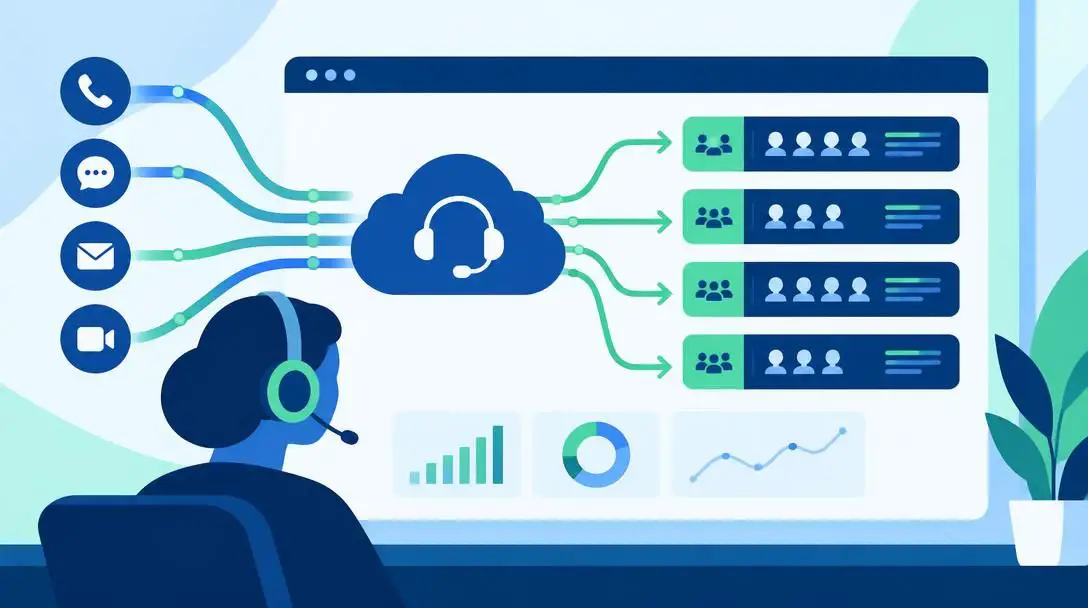
For organizations navigating heavy volumes of inbound communications, specialized CRM tools can also expand operational capacity without requiring immediate staff recruitment. By incorporating built-in call center routing mechanisms, these platforms direct incoming inquiries to external support teams who resolve standard FAQ-level questions offsite. This automated filtering keeps internal personnel from becoming overwhelmed by repetitive tasks so they can focus on high-value client engagements.
A centralized CRM database ensures that critical customer history remains completely visible to the entire team, even when an account manager is out of the office.
A structured framework for evaluating CRM software
Navigating the crowded marketplace requires a disciplined evaluation process. Adopting complex software too hastily often leaves companies paying for sophisticated services that do not align with their actual operating requirements. Following a structured methodology helps ensure your investment matches your current capacity and long-term organizational targets.
- Analyze core business needs: Meet with internal stakeholders to pinpoint existing operational bottlenecks and decide whether your primary aim is acquiring new sales leads or maintaining long-term monthly retention.
- Audit internal support capacity: Assess incoming inquiry volume to determine if your team requires external call routing features to handle simple FAQ questions without hiring additional support personnel.
- Gather feedback from industry peers: Consult professionals operating within your specific sector to discover which platforms perform reliably under real-world conditions, and examine verified user reviews online.
- Verify ease of use and device accessibility: Check whether the software provides an intuitive interface for employees of all technical skill levels, and ensure it supports mobile phone usage rather than restricting users to desktop computers.
- Test features through hands-on trials: Utilize vendor trial periods to navigate daily functions, assess interface speed, and confirm which subscription tier matches your operational scope.
Leading CRM platforms and their core strengths
Different CRM systems are built with distinct strengths, ranging from simplified visual navigation to enterprise-level telephony routing. Reviewing how top-rated platforms align with your workflow requirements simplifies the selection process.
Freshsales
- Trial length: 21 days
- Primary capability: Integrated call center routing
- Key operational focus: Handling high-volume incoming inquiries
Freshsales is equipped with robust communication tools designed to streamline customer touchpoints across multiple channels. The platform incorporates call center capabilities that allow businesses to filter and route incoming telephone inquiries offsite, protecting internal staff from high volumes of routine questions. Freshsales provides an extended 21-day trial period, giving teams extra time to evaluate interface usability and advanced telephony features before choosing a paid subscription plan.
Agile

- Primary capability: Call center management features
- Operational benefit: Offsite routing for basic inquiries
- Deployment focus: Scaling communication capacity
Agile is engineered to unify daily communications while expanding an organization's overall customer service reach. By integrating built-in call center routing tools, Agile enables growing companies to direct repetitive, FAQ-type customer phone calls away from core internal personnel. This infrastructure allows organizations to provide consistent customer support coverage without requiring substantial immediate investments in internal support staffing.
Nextiva

- Primary capability: Integrated call center infrastructure
- Support function: Filtering routine customer questions offsite
- Operational advantage: Preserving internal staff bandwidth
Nextiva delivers strong communication infrastructure focused on managing heavy inbound message volumes. Its platform integrates call center features that allow businesses to coordinate customer service operations smoothly, routing entry-level questions to external resources. This ensures that routine customer requests are addressed quickly while preserving the internal team's attention for complex client relationships and critical operational tasks.
Pipedrive

- Primary capability: Intuitive navigation and pipeline tracking
- User benefit: Straightforward interface for non-technical staff
- Platform reputation: Recognized among the easiest systems to navigate
Pipedrive stands out in the CRM landscape due to its user-friendly interface and low learning curve. Often recognized as being among the easiest platforms to navigate, it helps businesses avoid user adoption issues among employees who are less comfortable with complex software. The interface allows team members to quickly monitor relationship statuses and manage deal pipelines without getting bogged down by complicated menu structures.
Zoho

- Primary capability: Comprehensive contact and deal management
- Market standing: Consistently top-reviewed by active users
- Adoption strength: Widely recommended through peer feedback
Zoho is a widely recognized platform that earns high marks across independent user reviews and peer recommendations. Its broad range of features supports various business workflows, making it a frequent recommendation among industry peers. Organizations looking for an established, versatile solution frequently select Zoho based on its proven track record in active commercial environments.
Monday

- Primary capability: Collaborative relationship and workflow tracking
- Market standing: Top-rated across user review platforms
- Operational focus: Visual coordination across teams
Monday provides an adaptable environment that earns high ratings from active users seeking structured visibility across daily operations. The system helps teams track relationship progress, organize account interactions, and maintain cross-departmental alignment. Its strong user reception makes it a prominent candidate for businesses seeking reliable feedback-backed software.
Zendesk

- Primary capability: Customer service coordination and relationship tracking
- Market standing: High ratings across verified user communities
- Operational focus: Structured customer support interactions
Zendesk is highly regarded in the software market for managing client communications and service touchpoints. Earning consistently high ratings among business users, the platform provides strong tools for organizations prioritizing customer support consistency and structured relationship tracking across multiple communication channels.
Insightly

- Primary capability: Contact management and project oversight
- Market standing: Well-regarded in independent peer ratings
- Key benefit: Reliable daily workflow tracking
Insightly is a well-regarded CRM platform that regularly earns strong reviews from business professionals. Built to help teams organize contacts, monitor ongoing communications, and coordinate project milestones, it offers dependable functionality for organizations seeking a proven system that holds top satisfaction scores among active users.

At a glance: Comparing key CRM platforms
Reviewing how prominent platforms compare across functionality, user accessibility, and trial parameters helps narrow down the ideal software for your organization's unique requirements.
| CRM Platform | Call Center Capabilities | Key Differentiator / Reputation | Free Trial Window |
|---|---|---|---|
| Freshsales | Yes | External inquiry routing; extended evaluation period | 21 days |
| Agile | Yes | Built-in call center routing for simple inquiries | Standard (14 days) |
| Nextiva | Yes | Offsite call handling to protect internal bandwidth | Standard (14 days) |
| Pipedrive | No | Noted as among the easiest platforms to navigate | Standard (14 days) |
| Zoho | No | Consistently earns top user reviews and peer praise | Standard (14 days) |
| Monday | No | Well-regarded platform with high user ratings | Standard (14 days) |
| Zendesk | No | Top-reviewed system for client communication management | Standard (14 days) |
| Insightly | No | Well-regarded across independent peer evaluations | Standard (14 days) |
Common pitfalls to avoid during the selection process
Choosing a CRM platform involves navigating common mistakes that can waste financial resources, reduce productivity, and create frustration across your organization. Avoiding these frequent traps keeps your implementation on track.
- Paying for unused enterprise services: Purchasing an oversized software package packed with unnecessary advanced features drains budgets and complicates daily workflows with tools your team never touches.
- Ignoring your team's technical skill level: Selecting complex software based solely on management specifications often backfires if less tech-savvy workers find the layout confusing, leading to incomplete data and low adoption.
- Overlooking mobile accessibility: Choosing a platform strictly accessible via desktop computers creates major bottlenecks for employees who travel, work remotely, or meet clients in the field.
- Skipping hands-on trial periods: Agreeing to long-term software contracts without putting the interface through a 14-day or 21-day trial prevents your team from discovering responsiveness issues or awkward workflows.
- Selecting software in isolation: Failing to consult peers in your specific industry or ignoring online user reviews often leads to buying platforms poorly matched to your sector's real-world demands.
Executing a smooth implementation and rollout
Once you have shortlisted platforms that fit your operational scope, executing a structured onboarding strategy ensures your investment pays off. Strategic preparation before full deployment minimizes disruptions to everyday customer interactions.
Begin by organizing an evaluation timeline based on vendor trial lengths. If you are comparing standard 14-day trials against extended periods like the 21 days offered by Freshsales, structure testing milestones ahead of time. Designate specific team members to test key operational responsibilities in the software, including logging outgoing telephone calls, tracking incoming emails, scheduling client meetings, and evaluating call routing if your company uses external support channels.
Carefully analyze tier options before finalizing your subscription. Because CRM vendors divide functional capabilities across tiered packages, review the specific features contained in each tier during your trial. Adjust your subscription choices so you pay solely for the tools that actively drive your business forward, avoiding costly higher tiers filled with dormant capabilities.
Finally, collect detailed feedback from every staff member involved in testing platforms like Pipedrive, Zoho, Monday, Zendesk, Insightly, Agile, or Nextiva. Compare employee observations regarding menu navigation, mobile usability, and speed. Choosing a software platform that aligns with internal team capabilities and budget limitations ensures a productive transition that strengthens customer relationships over the long term.
Frequently asked questions
How long do CRM trial periods usually last?
Most leading CRM platforms offer a standard free trial that lasts for 14 days, allowing teams to explore core functionality. Some providers offer longer evaluation periods, such as Freshsales, which provides an extended 21-day trial window to evaluate its tools.
How can a CRM assist businesses with limited customer support staff?
Platforms equipped with call center routing capabilities, such as Freshsales, Agile, and Nextiva, can route high volumes of incoming inquiries to offsite resources. This allows easier FAQ-type phone calls to be resolved externally so internal staff are not overwhelmed.
Why is mobile phone access critical when selecting a CRM?
Some CRM platforms are restricted to desktop computers, which limits operational flexibility. Mobile accessibility allows team members who travel, meet clients offsite, or work remotely to view meeting records, check contact notes, and update deals from anywhere.
What is the most common financial mistake companies make when buying a CRM?
The most widespread financial mistake is purchasing an oversized subscription package filled with complex enterprise features that the company does not need. This results in paying excessive fees for tools that remain entirely unused.
Which CRM is specifically noted for ease of navigation?
Pipedrive is frequently noted as being among the easiest CRM platforms to navigate, making it a strong choice for businesses seeking an intuitive interface that less tech-savvy employees can quickly adopt.
The bottom line
Selecting the right CRM is not about buying the platform with the longest feature list; it is about choosing software that fits your company's operational reality. Whether your priority is guiding sales leads through deal pipelines, retaining accounts on a monthly schedule, or managing incoming call volumes through external routing, clarity regarding your primary objective is critical. By pairing user feedback and industry recommendations with hands-on trial testing, your business can adopt a platform that empowers your team, protects your software budget, and ensures your customer base receives prompt, reliable service.





