
Why Is My Phone Soo Slow?

Few everyday digital experiences match the sheer irritation of a smartphone that creeps along at a sluggish crawl. Whether your screen locks up while scrolling social feeds, apps unexpectedly crash mid-task, or the dialer takes several seconds just to register a phone number, device slowdowns bring your productivity and entertainment to an abrupt halt. It is easy to forget that beneath the polished glass and aluminum exterior, smartphones are complex, miniature personal computers balancing millions of calculations every second.
Because these handheld devices operate under the exact same principles as desktop towers, their internal hardware components and software environments are vulnerable to clutter, thermal strain, and resource exhaustion. An operational smartphone relies on an intricate balance between the processor, internal storage drives, system memory, power cell, and network antennas. When any single pillar in this delicate digital architecture fails or becomes throttled, the entire operating system begins to stumble. Diagnosing the underlying culprits can restore your mobile device to its snappy factory state or clarify when an upgrade is genuinely necessary.
Key takeaways
- Mobile slowdowns usually stem from full storage drives, chemically degraded batteries, outdated operating systems, resource-heavy background apps, or poor network links.
- Lithium-ion batteries typically lose around 20 percent of their original capacity after 300 to 500 charge cycles, triggering automated processor down-regulation to prevent sudden shutdowns.
- Smartphones older than two years frequently miss out on major operating system updates, leaving them ill-equipped to handle modern software architectures.
- Aggressive third-party cleaning utilities often worsen device performance by running unwanted background processes that waste memory and processor cycles.
- Distinguishing between local hardware lag and remote network latency prevents wasted effort spent troubleshooting a perfectly healthy handset.
The Five Core Causes of a Sluggish Phone
When your mobile operating system starts to stutter, the breakdown can almost always be mapped back to five primary pain points. Reviewing how these factors intersect allows you to quickly isolate the exact source of your device's poor performance.
| Culprit | Primary Hardware Impact | Common Symptom |
|---|---|---|
| Lack of Space and Memory | Storage drives and volatile RAM | App freezes, failed launches, and delayed interface inputs |
| Poor Battery Health | Power cell and processor frequency | System throttling, sluggishness during low-charge states |
| Older Operating System | Software compatibility and APIs | App crashes, unsupported features, and system-wide hesitation |
| Too Many Active Apps | Multitasking RAM and background CPU | Rapid battery drain, device overheating, and switching lag |
| Weak Wi-Fi Connection | Wireless transceivers and data pipelines | Endless loading spinners, media buffering, and upload failures |
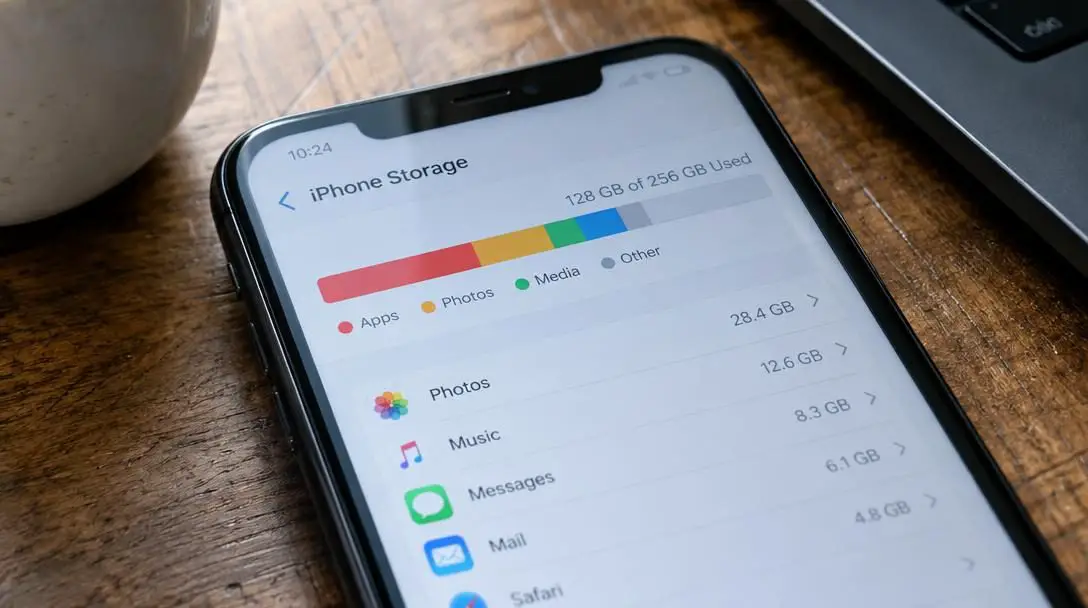
Lack of Space and Memory
Storage exhaustion remains the single most common reason why a mobile phone drops to a turtle-like pace. Every single process your handset executes—from opening a photo gallery to rendering a high-definition video—demands temporary and permanent operational room. When your phone's internal storage drives are packed to the brim with forgotten offline downloads, massive 4K video clips, and hundreds of unused applications, the operating system no longer has the computational breathing room to write temporary cache files. Without this crucial working margin, the device must constantly clear, compress, and shuffle data on the fly, creating severe system-wide stutters.
Poor Battery Health
Lithium-ion power packs do not last forever; standard mobile batteries are engineered to retain optimal output for roughly 300 to 500 charge cycles. Past this operational benchmark, a battery's capacity reliably drops by approximately 20 percent. As battery health deteriorates over months of heavy use, the chemical components become incapable of safely delivering peak electrical current to the central processing unit. To stop the handset from abruptly crashing or shutting down entirely during intense workloads, modern operating systems intentionally downscale processing frequencies. In short, your phone makes itself slower on purpose to protect failing hardware.
An Older Operating System
Software ecosystems move forward relentlessly. Application developers constantly write, refine, and compile their code around the capabilities, frameworks, and security layers of the newest operating system builds. If your handset is still running a legacy operating system, modern apps may buckle under inefficient compatibility translations. While manufacturers roll out software updates for several years, older hardware eventually gets dropped from eligibility. Once a smartphone passes two years of age, there is an escalating probability that its fundamental system architecture is falling behind current software requirements.
Too Many Active Apps
Modern mobile usage encourages rapid multitasking. In a matter of minutes, an average user might cycle through email clients, mobile banking platforms, GPS navigation, graphically demanding games, and social media feeds. When you exit an application, it rarely vanishes entirely from the system's memory. Instead, many services linger in the background, continuously running background location tracking, refreshing content feeds, and pinging push notification servers. When dozens of apps compete for the same pool of processing power and working memory, active foreground tasks are starved of resources.
Weak Wi-Fi Connections
Often, a phone that seems on the verge of hardware failure is completely fine under the hood. Modern mobile software depends heavily on remote cloud servers to stream UI elements, fetch user profiles, and load high-resolution assets. When your handset is shackled to an unstable, congested, or low-bandwidth Wi-Fi network, applications must sit idle while waiting for inbound data packets. This connection latency mimics severe hardware freezing, misleading users into believing their physical handset has broken down when the true bottleneck is an underperforming wireless router.
A dying battery is often misdiagnosed as an outdated processor, as modern operating systems intentionally throttle hardware speed to avoid unexpected shutdowns.
How Internal Processes and Hardware Interact
To pinpoint why a phone slows down, it is essential to understand what happens inside the chassis when you touch the screen. Launching any tool triggers an immediate chain reaction between the processor, volatile working memory, persistent storage chips, and the power management unit. The operating system uses internal storage not just to hold your personal photo library, but also as a high-speed scratchpad for cache files. These cache directories store frequently accessed data so apps can resume instantaneously. When internal storage is full, the device must read and overwrite blocks continuously, putting severe mechanical stress on data pipelines and generating noticeable input lag.
Simultaneously, chemical battery degradation places strict physical caps on peak clock speeds. When an older battery faces a demanding computing request, its internal electrical resistance spikes. If the processor attempted to run at full speed under these conditions, the voltage would collapse, causing the phone to turn off instantly. The operating system's kernel steps in to dynamically throttle the processor, prioritizing stability over speed. When you combine this defensive throttling with a cluttered storage drive and poor network connectivity, even basic operations like opening a contacts list turn into a frustrating ordeal.

Practical Steps to Speed Up Your Device
Revitalizing an underperforming handset does not require specialized engineering knowledge. Working systematically through the primary failure points will often restore responsive, snappy navigation without necessitating a factory reset.
- Audit and purge device storage: Comb through your device settings and delete apps you have not opened in months. Transfer high-resolution home videos and expansive photo albums to secure cloud storage or an external hard drive. If your handset includes a microSD card slot, shift media files onto an external memory card to liberate precious primary storage.
- Test your battery under full charge: Connect your handset to an official, verified wall charger and let it reach a full charge. Test the responsiveness of your applications while connected to wall power or immediately after unplugging. If system responsiveness noticeably jumps back to normal, your battery's chemical aging is the primary root cause.
- Check for available operating system updates: Open your system settings to inspect whether any pending operating system patches or security updates are ready for installation. If your phone is more than two years old and is no longer eligible for system upgrades, plan your budget for an eventual device replacement.
- Restrict background permissions and running apps: Close running apps you are done with, then review application permissions inside your settings. Revoke background app refresh and continuous location tracking permissions for services that do not strictly require them to function.
- Isolate your network connection: When an online tool or browser tab freezes, run a speed-testing application to inspect current download and upload speeds. Temporarily disconnect from Wi-Fi and switch over to mobile cellular data. If performance instantly snaps back, the issue lies with your local wireless router rather than your phone's hardware.
Common Troubleshooting Mistakes to Avoid
When attempting to fix a sluggish phone, many users adopt habits that provide no meaningful speed gains or actively damage their device's stability. Sidestepping these missteps will save you countless hours of trial and error.
- Ignoring storage warnings until total capacity is reached: Driving a device until zero megabytes remain leads to file system corruption, severe UI crashes, and occasional boot-loops that require emergency recovery mode.
- Installing third-party cleaner and booster utilities: Downloadable "RAM booster" and "cache cleaner" tools are frequently loaded with aggressive telemetry and pop-up advertisements. Ironically, they stay resident in memory, hogging the exact processing resources you are trying to free up.
- Assuming a weak battery only limits runtime: Many owners dismiss battery health because they do not mind charging their phone twice a day, failing to realize that battery degradation directly cripples peak processor speeds.
- Confusing hardware stutter with network latency: Spending hours clearing system caches or performing full operating system restores will not make web pages load faster if the true issue is an oversubscribed Wi-Fi network with inadequate upload speeds.
Frequently asked questions
How much free storage space does a smartphone need to run smoothly?
A smartphone needs sufficient open room on its internal drive to build temporary swap directories, cache operational files, and receive background application updates. When your storage is packed to capacity with apps and photos, the system lacks the breathing room to complete basic functions smoothly, leading to lag and app crashes.
How many charge cycles can a phone battery handle before degrading?
The typical smartphone battery is manufactured to provide roughly 300 to 500 charge cycles before degrading. Once you cross this operational threshold, the overall capacity of the battery generally drops by around 20 percent, which often causes the operating system to downscale processor speed to conserve remaining power and prevent shutdowns.
Why do phones older than two years struggle with modern applications?
Software developers optimize their applications to match the latest operating system builds and modern hardware standards. Devices that are more than two years old face a significant chance of falling behind in system updates, which leaves them running outdated operating systems that struggle to interface smoothly with newly built apps.
Do third-party cleaning apps help speed up a phone?
No, third-party cleaning and boosting apps frequently make mobile slowdowns worse. These utilities often run persistent background tasks of their own, adding extra computational strain to the operating system rather than removing it. Managing storage clutter and permissions directly through built-in system settings is much safer and more effective.
How can I tell if my phone's slowness is caused by a bad Wi-Fi connection?
You can diagnose connection lag by running a free network speed checker to evaluate your current download and upload speeds. Alternatively, temporarily toggle off your Wi-Fi and switch over to your mobile cellular data plan; if the phone performs snappily on mobile data, an underperforming Wi-Fi network is the real culprit.
The bottom line
Smartphones are extraordinarily capable handheld computers, but they are not immune to the physical realities of wear, resource bottlenecks, and chemical degradation. When your handset crawls to a halt, the issue almost inevitably stems from full storage drives, an exhausted battery, an outdated operating system, runaway background tasks, or a sluggish Wi-Fi network. By regularly pruning unnecessary apps, moving media files to the cloud, managing background permissions, and tracking your battery's health, you can keep your device running reliably for years.
However, if you have exhausted all practical troubleshooting steps—clearing storage drives, inspecting the battery, restricting background apps, and verifying strong network connectivity—yet the device remains consistently unresponsive, your phone may be dealing with internal hardware failure, corrupted storage chips, or malware. In these scenarios, scheduling an appointment with an authorized repair technician will help determine whether a simple battery replacement can revive your device or if it is finally time to upgrade to modern hardware.





